LLR: Life Logging in Obsidian with One Command
Toggle Task — create, start, finish. LLR is an Obsidian plugin that turns your daily note into a simple, plain-text time log. No complex UI. No lock-in. Just Markdown checkboxes.
Every task management tool I’ve tried adds friction. Custom UIs, proprietary formats, sync issues. I wanted something that lives inside my daily note, records what I’m doing and when, and gets out of the way.
LLR (Life Log Radio) is the Obsidian plugin I built to solve this. It takes the GTD principle of getting things out of your head, the daily note habit of writing everything in one place, and the review practice of having data to reflect on — and compresses them into a single command.
One command does everything
The only command you need is Toggle Task. Assign it a keyboard shortcut and you’re set.
- Create — Hit
Toggle Taskon an empty line →- [ ]appears. Type “reply to emails” - Start — Hit
Toggle Taskagain → current time is inserted, status changes to in-progress- [/] - Finish — Hit
Toggle Taskone more time → completion time and duration are recorded- [x]

Everything is stored as Markdown checkboxes. Uninstall the plugin and your data stays — it’s just text.
Made a mistake with the time? Edit the numbers directly. LLR works with plain Markdown, so manual corrections are always possible.
On mobileAdd Toggle Task to the Mobile Toolbar (the icon row above the keyboard). Short press toggles. Long press gives you undo, align-to-previous, and other helpers.
Ask AI instead of reading docs
LLR is designed around a simple idea: you shouldn’t have to memorize how a plugin works. What matters is the habit of recording, not the ability to recall commands.
LLR’s full specs are published on GitHub. When you need help, give your AI assistant one URL:
https://github.com/goryugocast/llr/tree/main/docs
Most plugins write documentation for humans to read. LLR takes the opposite approach — the docs are there for AI to read on your behalf. You don’t need to learn the details.
- “Read https://github.com/goryugocast/llr/tree/main/docs and show me how to set up routines”
- “Read this URL and find the command for logging something after the fact”
- “Read this URL and show me all LLR commands”
Learn Toggle Task. Let AI handle the rest. That’s how LLR is meant to be used.
Install (via BRAT)
- Install and enable the “BRAT” community plugin
- In BRAT settings, select “Add Beta plugin” and enter
goryugocast/llr - Enable LLR
Key commands
| Command | What it does |
|---|---|
| Toggle Task | Create, start, or finish a task |
| Skip Task (Log Only) | Mark a task as skipped without executing it |
| Open Summary View | Show today’s progress in the sidebar |
Task states
| State | Format |
|---|---|
| Pending | - [ ] task name (estimated time) |
| In progress | - [/] HH:mm - task name |
| Completed | - [x] start - end (duration) task name |
Summary View
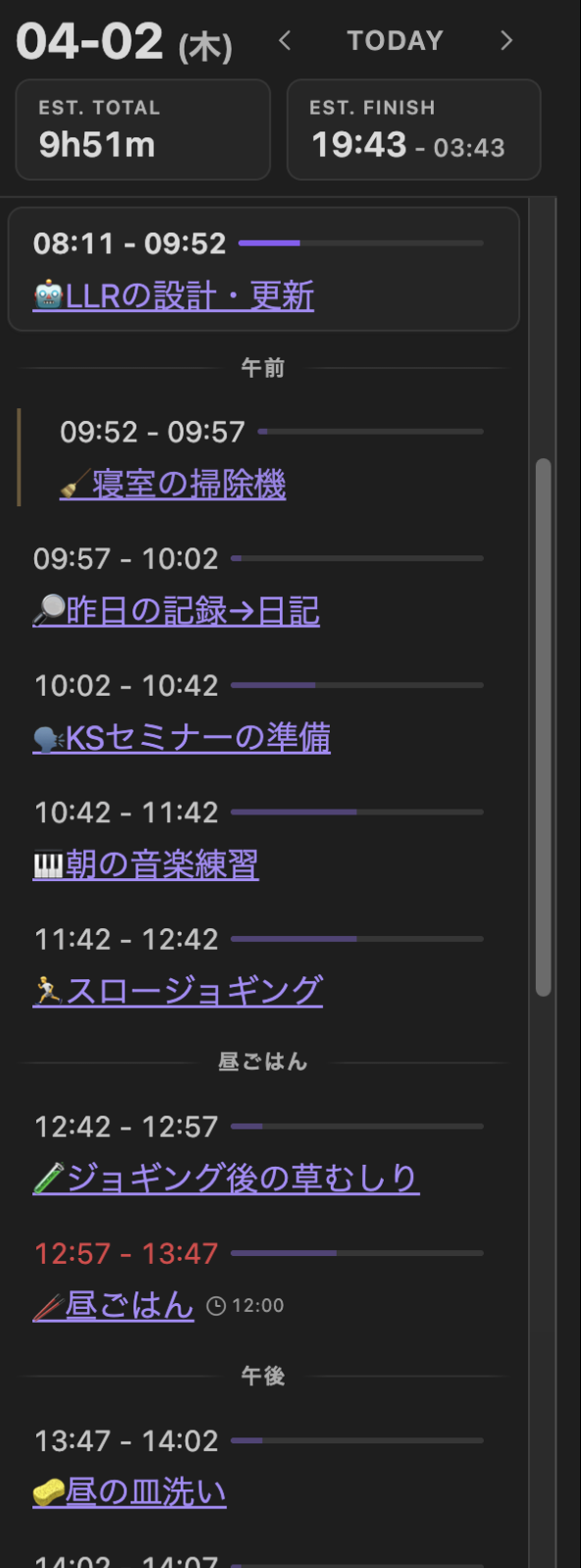
The sidebar shows your day at a glance: completed tasks, what’s running now, what’s left, and estimated finish time. Date navigation lets you review previous days.
Full documentation
Detailed docs — all 13 commands, routine configuration, data format specs — are available at goryugo.com/topics/llr (Japanese).